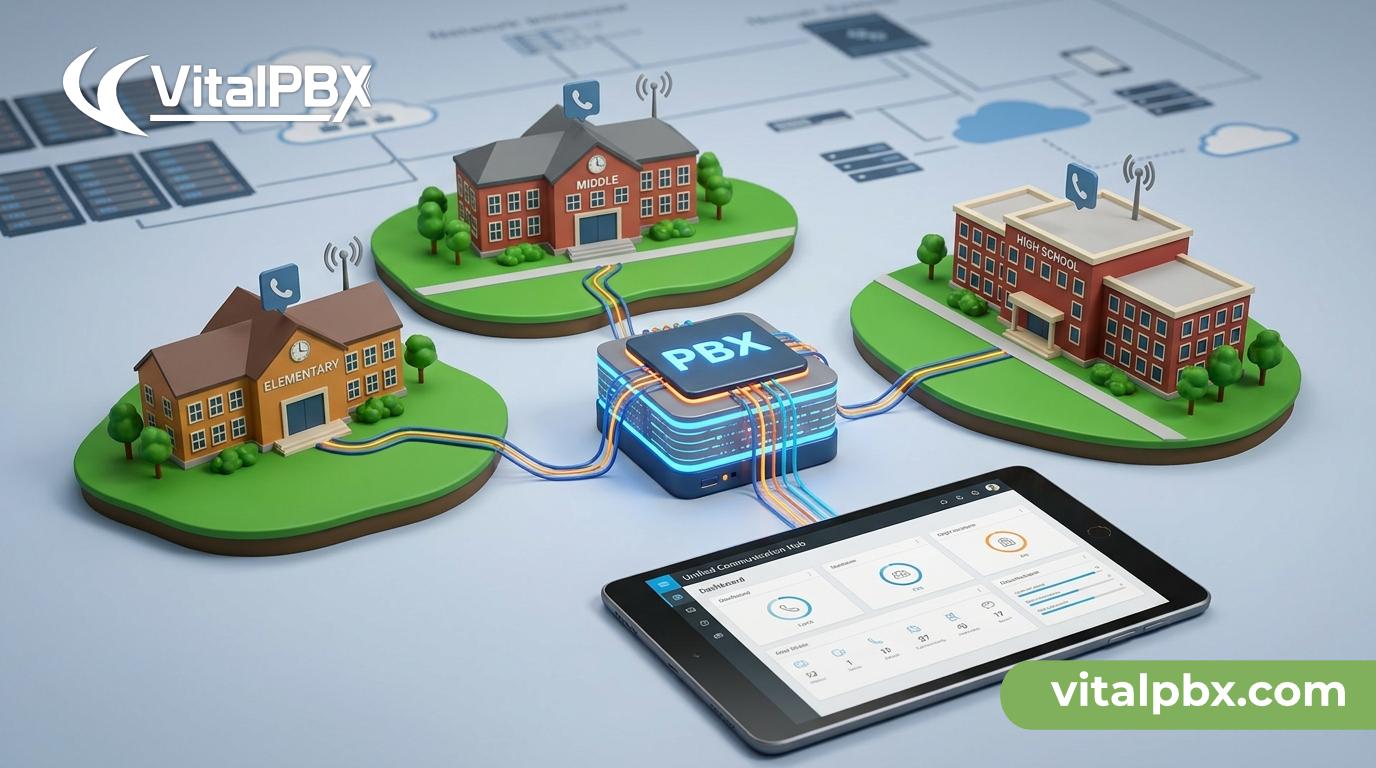
Multi-Campus Phone System: Manage Every School Building From One PBX
Managing communication across a school district is harder than it looks. You have multiple buildings, separate administrative offices, a central district office, and dozens — sometimes hundreds — of staff members who need reliable phone service every single day. Most phone systems were designed for a single location, so scaling across a district means paying for multiple platforms, juggling multiple support contracts, and dealing with zero visibility across sites.
There’s a better way. A properly configured multi-campus phone system lets you run every school building from a single PBX — one platform, one interface, one bill. This post explains how VitalPBX handles multi-campus deployments using its multi-tenant architecture, what that means for your day-to-day IT workload, and how it compares to the alternatives district IT admins typically consider.
Here’s what you’ll learn: how multi-tenant PBX works, why it matters for K-12 and higher education environments, how VitalPBX is configured for multi-campus use, and what to expect on pricing.
The Problem With School District Phone Systems
Most districts end up with communication infrastructure that grew organically — one school at a time. Elementary gets a hosted VoIP account. The middle school keeps an aging PBX from 2011. The high school runs a different cloud platform entirely. The district office uses something else.
The result is predictable: no centralized visibility, no shared dial plans, no way to transfer a call between buildings without going through an outside number, and IT admins managing three or four vendor relationships simultaneously.
Hosted VoIP systems solve some of this, but they introduce per-user fees that scale painfully as your district grows. Add a new staff member at each of five campuses and you’re paying for five new seats — every month, forever. When you’re working within a fixed budget cycle, that model punishes growth.
Legacy on-premise systems offer more control but rarely support multi-site administration from a single interface. You end up SSH-ing into multiple servers or dispatching someone on-site every time a configuration change is needed. Neither scenario is sustainable for a lean IT team covering a whole district.
How Multi-Tenant PBX Solves the Multi-Campus Challenge
Multi-tenant PBX is the architectural answer to this problem. Instead of deploying a separate phone system for each building, you deploy one PBX server and create isolated tenant environments — one per campus or administrative unit — all managed from a single administrator dashboard.
Each tenant operates independently. The high school can have its own extensions, IVR menus, call queues, voicemail, and ring groups without any of that configuration touching the elementary school’s setup. Staff at each campus interact with their own phone system. The district IT admin sees everything from one place.
VitalPBX’s multi-tenant capability is built into the platform at the architecture level — not bolted on as an afterthought. You can manage up to approximately 100 tenant instances on a single server, which comfortably covers even large districts. Each tenant can be independently configured with its own:
- Extension ranges
- IVR and auto-attendant menus
- Call queues and ring groups
- Time conditions and business hours
- Voicemail with AI transcription
- Class of service rules (who can call where and when)
This means the district IT admin controls the infrastructure layer while delegating day-to-day configuration to a designated administrator at each campus — without giving them access to anything outside their own tenant.
How VitalPBX Is Configured for Multi-Campus Deployments
VitalPBX runs on a single Debian 12 64-bit minimal installation — either on-premise hardware at your district office or on a VPS in your preferred cloud environment. One server. One operating system. One platform to maintain.
Setting Up Tenants Per Campus
Once VitalPBX is installed, you create a tenant for each campus through the multi-tenant management interface. Each tenant gets its own subdomain or SIP trunk, its own extension range, and its own administrative login. From the master admin view, you can see all tenants and navigate between them without logging out.
This is where VitalPBX separates itself from solutions like 3CX, which requires a separate server instance for each PBX. With VitalPBX, your entire district’s voice infrastructure runs on one server — dramatically reducing hardware costs, licensing complexity, and maintenance overhead.
Connecting SIP Trunks to Each Campus
Each tenant can connect to its own SIP trunk, allowing campuses to maintain their own DIDs (direct inward dial numbers) and outbound caller ID. The high school keeps its published phone number. The district office keeps its main line. Nothing changes for staff or parents.
You can also configure inter-tenant dialing so staff can reach colleagues at other buildings using short extension codes — no need to dial an outside number to transfer a call from the main office to the principal at another campus.
IVR and Auto-Attendant Per Campus
Every school building typically has different call routing needs. The elementary school may route incoming calls to the main office first, then to a nurse’s line during specific hours. The district administration building may need a multi-level IVR with options for HR, finance, and IT support.
VitalPBX lets you build all of this per tenant using a visual IVR editor, time conditions, and ring groups — independently, without affecting any other campus. Changes at one site don’t ripple across the district.
Voicemail and Call Recording
Voicemail is configured per extension within each tenant. VitalPBX includes AI-powered voicemail transcription, so staff receive voicemail messages as readable text in their email — useful for administrators who are frequently in meetings or classrooms.
Call recording can be enabled at the trunk, extension, or queue level — per tenant. This is particularly useful for district administration and counseling departments where documentation is required.
Mobile and Desktop Access
Teachers and staff who work across multiple buildings or work remotely can use the VitalPBX Connect mobile app or Vitxi, VitalPBX’s WebRTC softphone, to stay connected on their district extension from any device. No hardware phone required.
VitalPBX vs. the Alternatives for School Districts
Let’s be direct about how VitalPBX compares to what most districts are currently running or evaluating.
vs. Hosted VoIP (RingCentral, Vonage, etc.)
Hosted VoIP charges per user, every month. A district with 300 staff members pays 300 seats indefinitely. VitalPBX has no per-user or per-extension fees. You pay one license cost regardless of whether you have 50 extensions or 5,000. For a district with multiple campuses and hundreds of users, the long-term total cost of ownership is dramatically lower.
vs. 3CX
3CX is frequently evaluated for multi-site deployments, but its multi-tenant architecture requires a separate server for each PBX instance. Managing five campuses means managing five servers — five OS updates, five backups, five points of failure. VitalPBX runs all of them on one server, managed from one interface.
vs. FreePBX
FreePBX is open-source and capable, but its interface is rougher, its commercial add-ons are fragmented, and multi-tenant support is less mature. VitalPBX offers a cleaner management interface, a purpose-built Sonata Suite of commercial add-ons, active development, and commercial support — which matters when a system goes down during the school day.
vs. Legacy On-Premise PBX
Traditional PBX systems (Avaya, NEC, Cisco CUCM) were designed for a different era. They’re expensive to maintain, require specialized vendor support, and rarely support modern features like WebRTC softphones, AI voicemail transcription, or CRM integrations. VitalPBX delivers all of that on commodity hardware.
VitalPBX Plans for School Districts
VitalPBX offers several licensing plans. The right choice for a district depends on your size and whether you need multi-tenant capability.
VitalPBX One
Designed for SMBs and smaller organizations. Includes Microsoft Teams integration, the VitalPBX Connect mobile app, and multi-tenant support. A strong fit for smaller districts that need modern features without enterprise complexity.
Enterprise Plan
Supports up to 5,000 extensions with the full VitalPBX feature set plus priority support. Ideal for mid-to-large districts with heavy call volumes and multiple campuses.
Multi-Tenant Plan
Purpose-built for deployments where managing multiple isolated tenants is the primary requirement. Approximately 100 tenants per server is the practical limit due to the underlying Asterisk engine constraints. This plan is the natural fit for districts managing five, ten, or more campus environments from a single server.
Add-On: Sonata Suite
For districts with a main administrative office acting as a switchboard, the Sonata Switchboard provides a real-time call management dashboard. For any campus running a front-desk operation with high call volume, Sonata Stats and Sonata Recordings deliver queue performance reporting and call recording management.
All paid plans include a free trial period so you can validate the setup before committing.
Frequently Asked Questions
What is a multi-campus phone system?
A multi-campus phone system is a PBX deployment that serves multiple physical locations — such as different school buildings within a district — from a single platform. Rather than installing and maintaining a separate phone system at each site, a multi-campus PBX centralizes management while still allowing each location to operate independently with its own extensions, call routing, and phone numbers.
How many campuses can VitalPBX support on one server?
VitalPBX can support approximately 100 tenant instances on a single server. Each tenant represents an isolated PBX environment — for example, one per campus. This is a practical limit based on the underlying Asterisk engine, and it comfortably covers the needs of most school districts. Very large districts with 100 or more campuses would need to evaluate a distributed architecture with the VitalPBX team.
Does VitalPBX charge per user or per extension?
No. VitalPBX does not charge per user or per extension. The license cost is flat — you pay the same whether you have 10 extensions or 5,000. This is one of VitalPBX’s core differentiators and makes it significantly more cost-effective than per-seat hosted VoIP platforms for organizations with large numbers of users.
Can staff at different campuses call each other directly?
Yes. VitalPBX supports inter-tenant dialing, which allows staff at one campus to reach staff at another campus using short extension codes — without dialing an outside number. This is configurable at the district level and dramatically simplifies internal communication across buildings.
What hardware does VitalPBX require?
VitalPBX is installed on a clean Debian 12 64-bit minimal installation. This can run on on-premise server hardware at your district office or on a VPS in your preferred cloud provider. It does not require proprietary hardware. The system requirements scale with the number of concurrent calls and tenants, and the VitalPBX team can advise on sizing for your specific deployment. Learn more at Debian.org about Debian 12.
Can different campuses have their own phone numbers and IVR menus?
Yes. Each tenant in VitalPBX can be connected to its own SIP trunk with its own DIDs and outbound caller ID. Each campus can also have an entirely independent IVR menu, call routing rules, business hours, ring groups, and voicemail configuration — all managed without affecting any other campus.
Is VitalPBX suitable for higher education, or is it only for K-12 districts?
VitalPBX is well-suited for both K-12 districts and higher education environments. Universities and colleges with multiple departments, buildings, or satellite campuses benefit from the same multi-tenant architecture. The Enterprise plan supports up to 5,000 extensions, and VitalPBX has been deployed in higher education environments with complex call center requirements alongside standard telephony. The 2026 INTERNET TELEPHONY Product of the Year award reflects its capability across a wide range of enterprise use cases.
Ready to Simplify Your District’s Phone Infrastructure?
Managing communication across multiple campuses doesn’t have to mean managing multiple phone systems. VitalPBX gives you one platform, one management interface, and no per-user fees — regardless of how many buildings or staff members you’re supporting.
If you’re evaluating options for your district, the best next step is to see it in action. Our team can walk you through a multi-tenant configuration that matches your specific environment — campuses, call volumes, and integration requirements included.
Book a demo today:
- 🇺🇸 US (Eastern Time): Schedule with VitalPBX
- 🇪🇺 Europe: Schedule with VitalPBX Europe
Or explore VitalPBX further at vitalpbx.com and wiki.vitalpbx.com.