
VitXi, VitalPBX’s browser-based WebRTC softphone, just received a meaningful upgrade. Version 4.6.0-3 focuses on three areas IT administrators have consistently needed: faster extension onboarding, improved configuration visibility, and expanded hardware compatibility through native Yealink SDK support.
Whether you’re managing a fresh VitalPBX deployment or scaling an existing one, these updates reduce the steps between “new account” and “live call.”
Here’s everything that changed and what it means for your setup.
What Is VitXi and Why Does This Update Matter?
VitXi is VitalPBX’s built-in WebRTC softphone — it runs directly in the browser, requires no software installation, and gives users full phone functionality from any device with a supported browser. For IT admins, it’s the default interface for users who don’t need a physical desk phone.
The 4.6.0-3 update isn’t a redesign — it’s a precision upgrade. Each change addresses a real friction point in the provisioning and administration workflow.
PBX Extensions Bulk Onboarding
Previously, onboarding a large number of extensions to VitXi required working through them one by one. In environments with dozens or hundreds of users, that process added up fast.
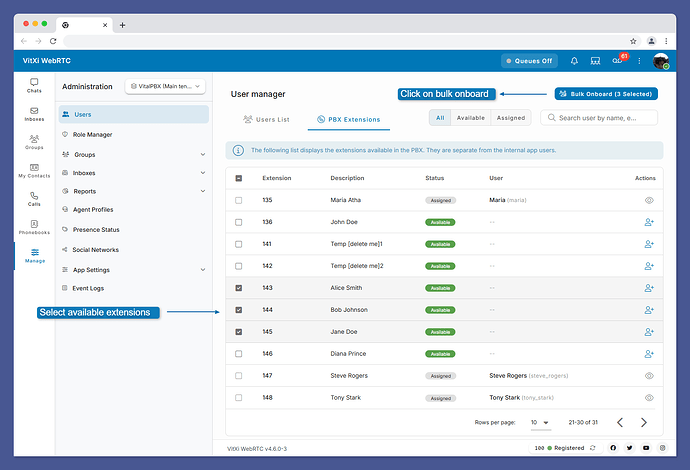
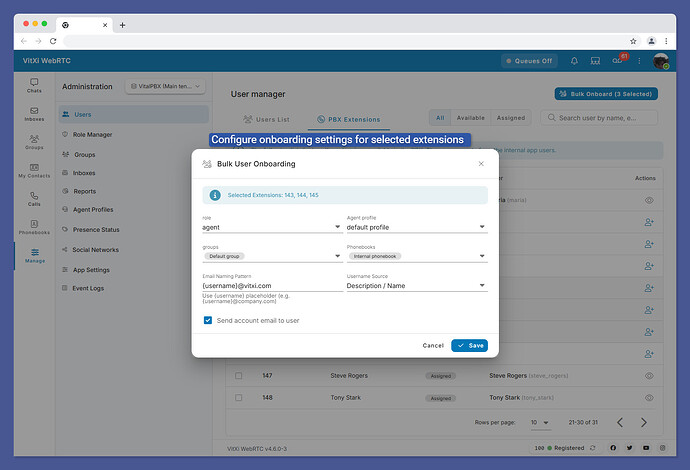
Version 4.6.0-3 introduces bulk onboarding for PBX extensions. Administrators can now select multiple extensions simultaneously and complete onboarding in a single operation. This is particularly valuable for:
- MSPs deploying VitXi across multiple client sites
- Enterprise rollouts where IT teams need to provision entire departments at once
- VitalPBX Multi-Tenant environments with high extension volume
This change alone can turn a multi-hour provisioning task into a matter of minutes.
On-Demand Welcome Message Sending
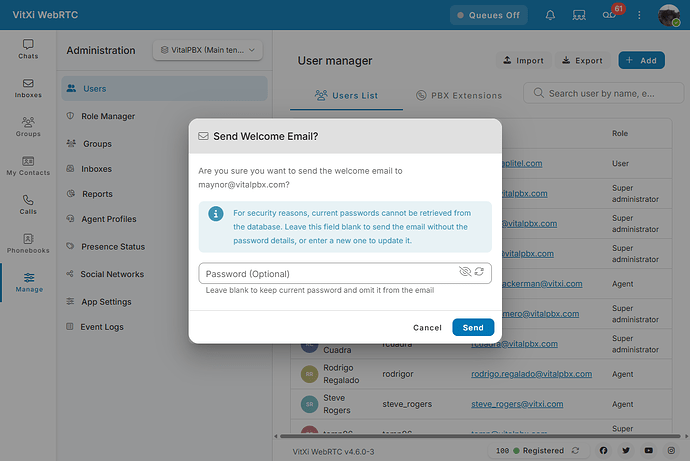
The VitXi Welcome message — which delivers login credentials and setup instructions to new users — previously fired automatically during the initial provisioning flow. If a user missed it, deleted it, or if re-onboarding was needed mid-support call, there was no clean way to resend it.
That changes in 4.6.0-3. Administrators can now manually trigger the Welcome message at any time from the extension management interface. This gives support teams the flexibility to:
- Resend credentials to users who lost or missed the original message
- Trigger onboarding messages during assisted setup sessions
- Handle re-provisioning scenarios without workarounds
It’s a small change with an outsized impact on day-to-day support workflows.
Extension Validation: WebRTC Profile Warnings
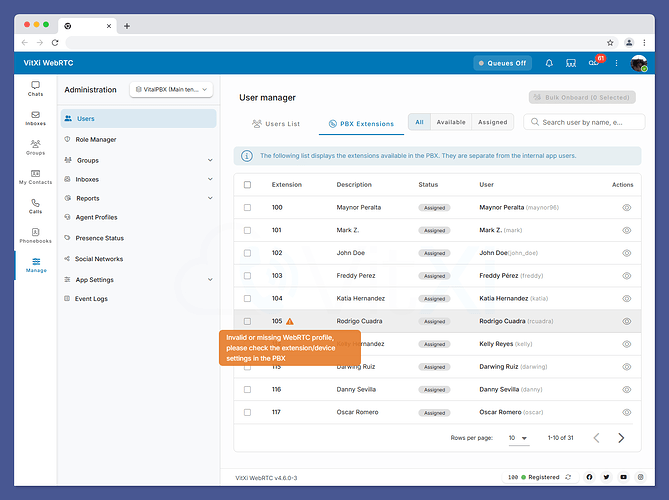
Misconfigured WebRTC extensions are one of the most common causes of VitXi login failures — and in a busy system, they’re easy to miss until a user reports a problem.
Version 4.6.0-3 adds warning indicators directly in the extension list for any WebRTC extension or device that does not have a properly assigned WebRTC profile. The warnings are visible at a glance, without needing to open each extension record individually.
For administrators managing large extension pools, this means:
- Faster identification of misconfigured extensions before they become support tickets
- Cleaner rollouts where every extension is validated before users log in
- Reduced back-and-forth between helpdesk teams and end users
This is the kind of proactive visibility that makes a meaningful difference in organizations with high extension turnover or frequent provisioning activity.
Streamlined User Creation Flow
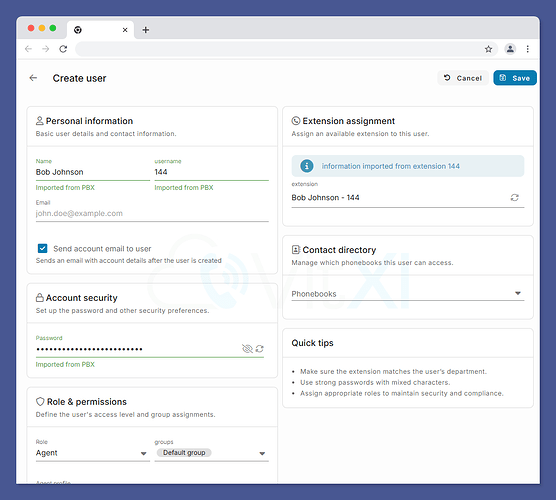
The user creation workflow in VitXi has been refined in a way that will be immediately noticeable to anyone who creates new users regularly.
Previously, when creating a new VitXi user and selecting an extension, the name, username, and password fields had to be filled in manually. In 4.6.0-3, selecting an extension now automatically populates those fields. The system pulls the relevant data from the existing extension record and pre-fills the form.
This reduces the number of manual inputs required and the chance of data entry errors — particularly useful in bulk setup scenarios or when provisioning under time pressure.
Yealink SDK Integration
The most significant capability addition in this release is native Yealink SDK support. VitXi now integrates directly with the Yealink SDK, enabling hardware call control between compatible Yealink peripherals and the VitXi softphone.
In practice, users with supported Yealink headsets, speakerphones, or desk phones can answer, end, mute, and transfer calls using their physical device controls — without leaving the VitXi browser interface.
Supported Devices
The following Yealink devices are supported in this release:
- WH6X — Wireless Bluetooth headsets
- BH7X — Bluetooth headsets
- UH3X — USB wired headsets
- UH4X — USB wired headsets
- SP9X — USB speakerphones
- MP45 — USB/Bluetooth desk phones
- Additional compatible Yealink peripherals
For organizations that have standardized on Yealink hardware, this integration eliminates the disconnect between physical devices and the browser softphone — one of the most common friction points when transitioning users to WebRTC-based telephony.
Full Yealink call control documentation is available at support.yealink.com.
Bug Fix: SIP Conversation Link Formatting
This release also resolves an issue where SIP Conversation links were not being properly formatted within VitXi. The fix ensures consistency in how SIP URIs are handled and displayed across the interface.
What This Means for VitalPBX Deployments
Taken together, the 4.6.0-3 changes reflect a clear focus on the provisioning and onboarding experience — reducing the manual work involved in getting extensions live and ensuring admins have the visibility to catch configuration problems early.
The Yealink SDK integration extends that story into hardware compatibility, giving VitXi a more complete answer for organizations that want browser-based calling without sacrificing the convenience of physical device controls.
VitalPBX, winner of the 2026 INTERNET TELEPHONY Product of the Year Award, continues to refine VitXi as the default softphone experience for its growing user base.
[Link: Explore VitalPBX Plans & Pricing — vitalpbx.com/pbx-plans-and-pricing-vitalpbx-system/] [Link: Full VitalPBX documentation — wiki.vitalpbx.com]
Frequently Asked Questions
What is VitXi and how does it work?
VitXi is VitalPBX’s built-in WebRTC softphone. It runs entirely in a web browser — no app installation required — and gives users access to their PBX extension directly from Chrome, Firefox, Edge, or other WebRTC-compatible browsers. It supports calling, transfers, voicemail, and standard telephony functions, all managed through the VitalPBX administration interface.
What Yealink devices are supported in VitXi 4.6.0-3?
VitXi 4.6.0-3 adds native Yealink SDK support for the WH6X and BH7X Bluetooth headset series, UH3X and UH4X USB headsets, SP9X USB speakerphones, MP45 desk phones, and additional compatible Yealink peripherals. The integration enables hardware call control — answering, ending, muting, and transferring calls using the physical device.
Does the bulk extension onboarding feature work with Multi-Tenant VitalPBX deployments?
Yes. Bulk onboarding is available in standard PBX and multi-tenant configurations. For MSPs managing multiple tenants on a single VitalPBX server, this significantly reduces the time required to onboard extensions across client PBX instances.
What happens if a VitXi extension doesn’t have a WebRTC profile assigned?
In VitXi 4.6.0-3, the extension list now displays a warning indicator next to any extension that is missing a properly assigned WebRTC profile. Without a WebRTC profile, the extension cannot authenticate with VitXi. The warning makes it easy to identify and correct these configurations before users attempt to log in.
Can I resend the VitXi Welcome message to an existing user?
Yes. Version 4.6.0-3 adds on-demand Welcome message sending. Administrators can manually trigger the Welcome message from the extension management interface at any time, making it easy to handle resend requests or assist users during support sessions.
Is VitXi included with VitalPBX plans?
VitXi is part of the VitalPBX platform. Availability and feature depth vary by plan. View VitalPBX Plans & Pricing for the full breakdown of what’s included at each tier.
VitXi 4.6.0-3 is available now. Update through your VitalPBX administration panel to take advantage of these improvements.
Ready to see VitalPBX and VitXi in action? Start your 30-day free trial or book a live demo with the team.