


If your team lives inside Vitxi — VitalPBX’s WebRTC softphone — the 4.6.0 R4 release gives you more control over how calls are answered, how conversations get organized, and how your system emails look to customers. None of these are cosmetic tweaks. They fix real friction points agents and admins run into every day: calls that ring instead of auto-answering on a headset, tags that behave differently depending on which module you’re in, and password-reset emails that look like they were built in 2015.
This post walks through everything new in VitXi 4.6.0 R4: Advanced Auto Answer Settings, Centralized Tags & Labels, Customizable Email Templates, improved contact resolution, and the fixes that shipped alongside them.
What’s New in VitXi 4.6.0 R4
VitalPBX packaged this release around three main improvements, plus a contact-matching fix and two bug fixes:
- Advanced Auto Answer Settings under Settings > Calls
- Centralized Tags & Labels across Omnichannel Conversations, Contacts, and Call History
- A redesigned, customizable Email Templates module
- Improved contact resolution using telephone, mobile, and home numbers
- Fixes for Mail Settings and a User Manager scroll issue
Advanced Auto Answer Settings
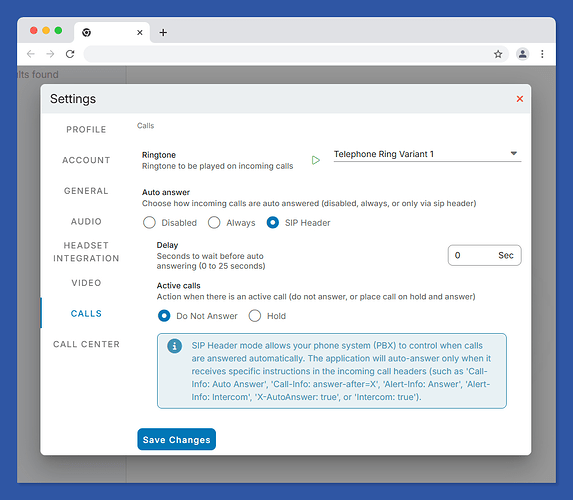
Auto Answer used to be an all-or-nothing setting. In 4.6.0 R4, VitXi gives you three modes under Settings > Calls:
- Disabled — calls always ring normally, no automatic pickup
- Always active — every call auto-answers, useful for dedicated agent stations or intercom-style desks
- Controlled by SIP headers from the PBX — VitXi reads Call-Info, Alert-Info, X-AutoAnswer, and Intercom headers and lets the PBX decide, call by call
That third option matters most for call centers and reception desks. It means your PBX-side routing logic — not a blanket client setting — determines when a call should auto-answer, which is exactly how paging, intercom, and supervised call scenarios are supposed to work.
Centralized Tags & Labels
Tags in VitXi used to feel like three separate systems depending on whether you were in Omnichannel Conversations, Contacts, or Call History. This release centralizes them into one consistent experience across all three modules.
What changed specifically:
- Sidebar filters so you can filter conversations, contacts, or calls by tag without leaving the view
- Count badges showing how many items carry each tag at a glance
- Improved tag chips that are easier to read and manage inline
- Multi-tenant tag management for Super Admin users — a meaningful upgrade for MSPs and resellers running multiple tenants who need tag consistency across accounts
- Performance optimizations so tag-heavy accounts don’t slow down as label volume grows
If your team relies on tags to route omnichannel conversations or flag VIP contacts, this update makes that workflow far less fragmented.
Customizable Email Templates
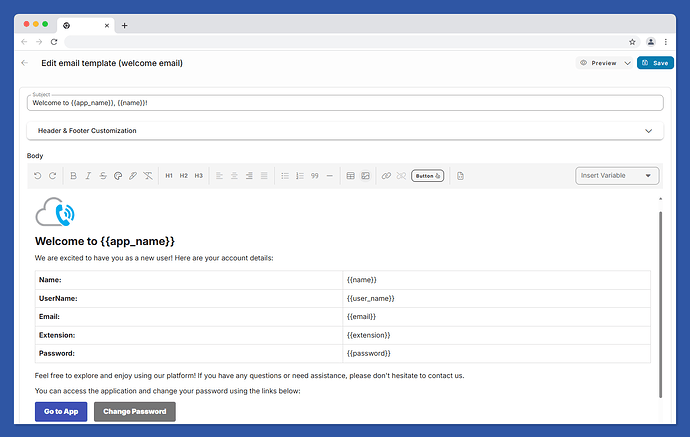
The Email Templates module got a full redesign. Previously, system emails — welcome messages, password resets — were fixed and hard to align with your brand. Now administrators get:
- A visual editor for building and adjusting templates without touching raw HTML
- Image controls for logos and header graphics
- Outlook-compatible buttons — a detail that matters more than it sounds, since Outlook’s rendering engine famously breaks standard HTML buttons
- Custom headers and footers for consistent branding across every system email
- Dynamic variables to personalize emails with contact or account data
- Test emails so you can verify formatting before it reaches a real customer
- Improved dynamic URL generation for links inside templates (password reset links, activation links, etc.)
For MSPs and resellers running Multi-Tenant deployments, this means every tenant’s welcome and password-reset emails can finally match their own branding instead of a generic default.
Improved Contact Resolution
VitXi now resolves phonebook contacts using all available numbers — telephone, mobile, and home — instead of matching against a single primary field. If a contact has three numbers on file and calls from their mobile, VitXi now correctly identifies them instead of showing an unknown caller. This is a small change with an outsized impact on call and message identification accuracy, especially for contacts with multiple lines.
Bug Fixes in This Release
VitXi 4.6.0-4 also resolves two issues reported by users:
- Mail Settings were not saving or updating correctly — fixed
- A scroll issue in the User Manager module made it difficult to navigate longer user lists — fixed
Frequently Asked Questions
What is Vitxi in VitalPBX?
Vitxi is VitalPBX’s browser-based WebRTC softphone. It lets users make and receive calls, manage contacts, and handle omnichannel conversations directly from a web browser without installing a separate desktop phone application.
How do I enable Auto Answer in VitXi 4.6.0-4?
Go to Settings > Calls in VitXi and choose one of three Auto Answer modes: Disabled, Always active, or controlled by SIP headers (Call-Info, Alert-Info, X-AutoAnswer, or Intercom) sent from the PBX. The SIP header option is recommended for call centers that need per-call control rather than a blanket setting.
Do the new Tags & Labels work across Multi-Tenant deployments?
Yes. This release adds multi-tenant tag management specifically for Super Admin users, so tags and labels can be managed consistently across tenants rather than configured separately in each one.
Can I customize the password reset and welcome emails in VitalPBX?
Yes. The redesigned Email Templates module includes a visual editor, image controls, Outlook-compatible buttons, custom headers and footers, and dynamic variables, so administrators can fully brand system emails like welcome messages and password resets. A test email option lets you preview changes before they go live.
Why does contact identification matter for call and message resolution?
Accurate contact resolution ensures calls and messages display the correct caller name instead of “unknown” when a contact has multiple phone numbers on file. VitXi 4.6.0-4 now checks telephone, mobile, and home numbers when matching incoming calls and messages to existing contacts.
How do I upgrade to VitXi 4.6.0 R4?
VitalPBX recommends upgrading to this release to get the latest improvements and fixes. Check the official VitXi changelog for upgrade instructions specific to your deployment.
Upgrade to VitXi 4.6.0-4
None of these changes require a new plan or add-on — they ship as part of the standard VitXi update. If you’re running an older VitXi build, upgrading gets your team a more flexible Auto Answer setup, a consistent tagging system across every module, and system emails that finally look like they belong to your brand.