
If your team spends half the day on calls, small frictions add up fast — fumbling for the mute button, hunting for a contact buried in three different lists, or missing a call because the headset didn’t register the “answer” click in time. VitalPBX’s WebRTC softphone, VitXi, just shipped an update aimed squarely at those frictions.
VitXi 4.6.0-5, released July 15, 2026, adds native Jabra SDK integration for hands-on-headset call control and a new centralized Phonebooks administration module for managing shared contacts across your organization. It also fixes a lingering chat notification bug. Here’s everything that changed and what it means for the people using VitXi every day.
Native Jabra SDK Integration
VitXi now integrates directly with the Jabra SDK, letting compatible Jabra headsets control calls without ever touching the keyboard or mouse. For agents and support teams fielding call after call, that’s a real reduction in the number of steps between “phone rings” and “conversation starts.”
Supported actions
- Answer calls
- Reject calls
- Answer calls while undocking the headset
- Hold and resume calls
- Swap between active calls
- Mute and unmute the microphone
- Trigger base station ringing for incoming calls
This kind of device-level integration matters most for call centers and busy support desks, where every extra click between “call ringing” and “call answered” adds up across hundreds of daily interactions. It also means less time looking at a screen and more time looking at whatever the agent actually needs to be doing — reading a ticket, pulling up an order, taking notes.
Centralized Phonebooks Module
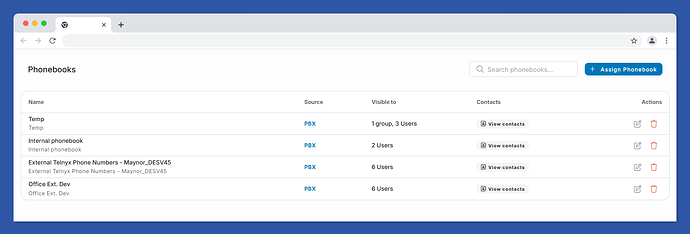
The second major addition in this release is a new Phonebooks administration module, designed to make shared contact management in VitXi far less messy.
What’s new
- A new centralized Phonebooks administration module
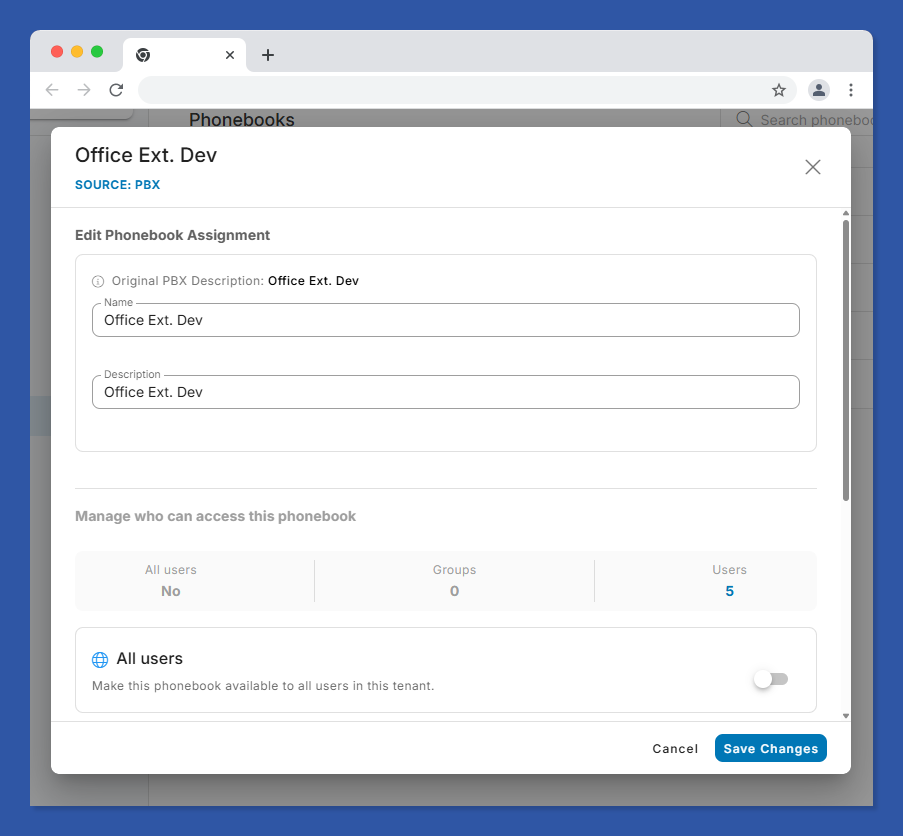
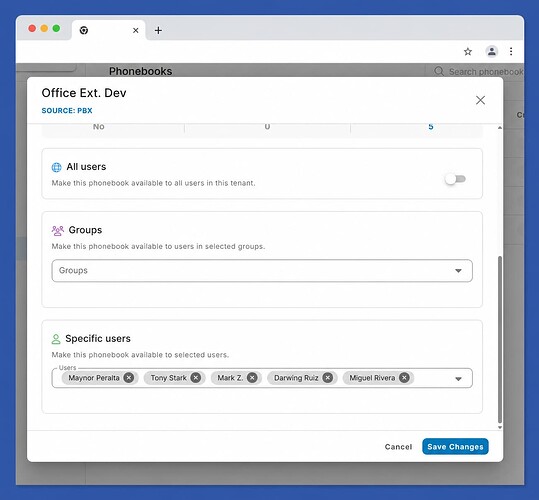
- Assign phonebooks to All Users, Groups, or Individual Users
- A cleaner, grouped view that prevents duplicate PBX phonebook entries
- A new Manage Assignments action for configuring who sees which phonebook
- A new View Contacts action to browse PBX phonebook contacts directly
- A visibility summary so admins can see at a glance who has access to each phonebook
- Full backward compatibility with existing phonebook assignments
- Multi-tenant awareness, so tenant boundaries are respected automatically
Previously, keeping shared contact lists consistent across users and groups meant more manual upkeep than it should have. This module centralizes that work into one place, with clear visibility into who can see what — which matters a lot for multi-tenant deployments where phonebook data needs to stay properly scoped between clients.
This release currently supports PBX phonebooks. According to VitalPBX, future versions will extend support to additional phonebook sources, giving admins more flexibility in how they manage corporate contacts going forward.
Issue Fixes
VitXi 4.6.0-5 also resolves an issue where the unread chat message badge count wasn’t updating correctly — a small fix, but one that matters if your team relies on VitXi’s chat alongside voice calls to stay responsive.
Why This Release Matters
Neither of these additions is flashy, and that’s kind of the point. Jabra SDK integration removes physical friction from call handling. The Phonebooks module removes administrative friction from contact management. Together, they’re the kind of incremental, practical improvements that make a softphone genuinely easier to run day to day — which is exactly what VitXi is built to be as the browser-based client bundled into the VitalPBX platform.
VitalPBX was named the 2026 INTERNET TELEPHONY Product of the Year, and updates like this one are part of why: steady, real-world improvements driven directly by customer feedback rather than headline features nobody asked for.
Getting VitXi 4.6.0-5
VitXi is VitalPBX’s built-in WebRTC softphone, so there’s no separate purchase or license involved — if you’re running a current VitalPBX deployment, this update applies directly to your VitXi client. If you’re evaluating VitalPBX for the first time, you can explore the available plans and see how VitXi fits into the full platform.
Frequently Asked Questions
What is VitXi?
VitXi is VitalPBX’s WebRTC-based softphone client, allowing users to make and receive calls, chat, and manage contacts directly from a web browser without installing separate desktop software. It’s built into the VitalPBX platform and works alongside VitalPBX Connect, the official mobile app.
What does the Jabra SDK integration in VitXi 4.6.0-5 do?
It allows compatible Jabra headsets to control VitXi calls directly from the device — answering, rejecting, holding, resuming, muting, and swapping between calls — without requiring the user to interact with their computer screen. It also supports triggering base station ringing and answering calls while undocking the headset.
What is the new Phonebooks module in VitXi?
It’s a centralized administration module for managing shared contact lists across VitXi users. Admins can assign phonebooks to all users, specific groups, or individual users, view a visibility summary of who has access to each phonebook, and browse PBX contacts directly — all from one interface that prevents duplicate entries.
Do I need to reconfigure my existing phonebooks after this update?
No. The new Phonebooks module is fully backward compatible with existing phonebook assignments, so current configurations carry over without requiring manual reconfiguration.
Is the Phonebooks module multi-tenant aware?
Yes. The module respects tenant boundaries automatically, which matters for MSPs and resellers running VitalPBX Multi-Tenant deployments where phonebook data must stay scoped to the correct tenant.
Will VitXi support phonebook sources beyond PBX phonebooks?
Not yet. VitXi 4.6.0-5 supports PBX phonebooks specifically. VitalPBX has stated that future versions will add support for additional phonebook sources to give admins more flexibility in managing corporate contacts.
Is VitXi free to use?
VitXi is included as part of the VitalPBX platform rather than sold separately, so its availability depends on your VitalPBX plan. Check the VitalPBX plans and pricing page for details on what’s included at each tier.
Want to see what VitXi and the rest of the VitalPBX platform can do for your team? Book a demo or explore VitalPBX plans and pricing to get started.